The Challenge Feature
Create your own company challenges independently via the WLP back office.

To promote the health of your employees, you can create various challenges directly in the WLP back office — in the areas of steps, training, knowledge, and mindfulness.
Important:
- Team challenges and bike challenges are currently not part of the challnge feature. If you would like to plan such formats, please contact our WLP customer service. Further information can be found at the bottom of the page and in the team challenges article.
- A challenge should be created at least 3 weeks before the challenge starts.
- No changes can be made 15 days before the start of the challenge, as communication about the challenge is released in the system at this point. However, the challenge can still be edited in the back office before the 15 days are up. So please plan your challenge early enough!
- You can create one challenge for the company per quarter.
1. Activity type: Select challenge type
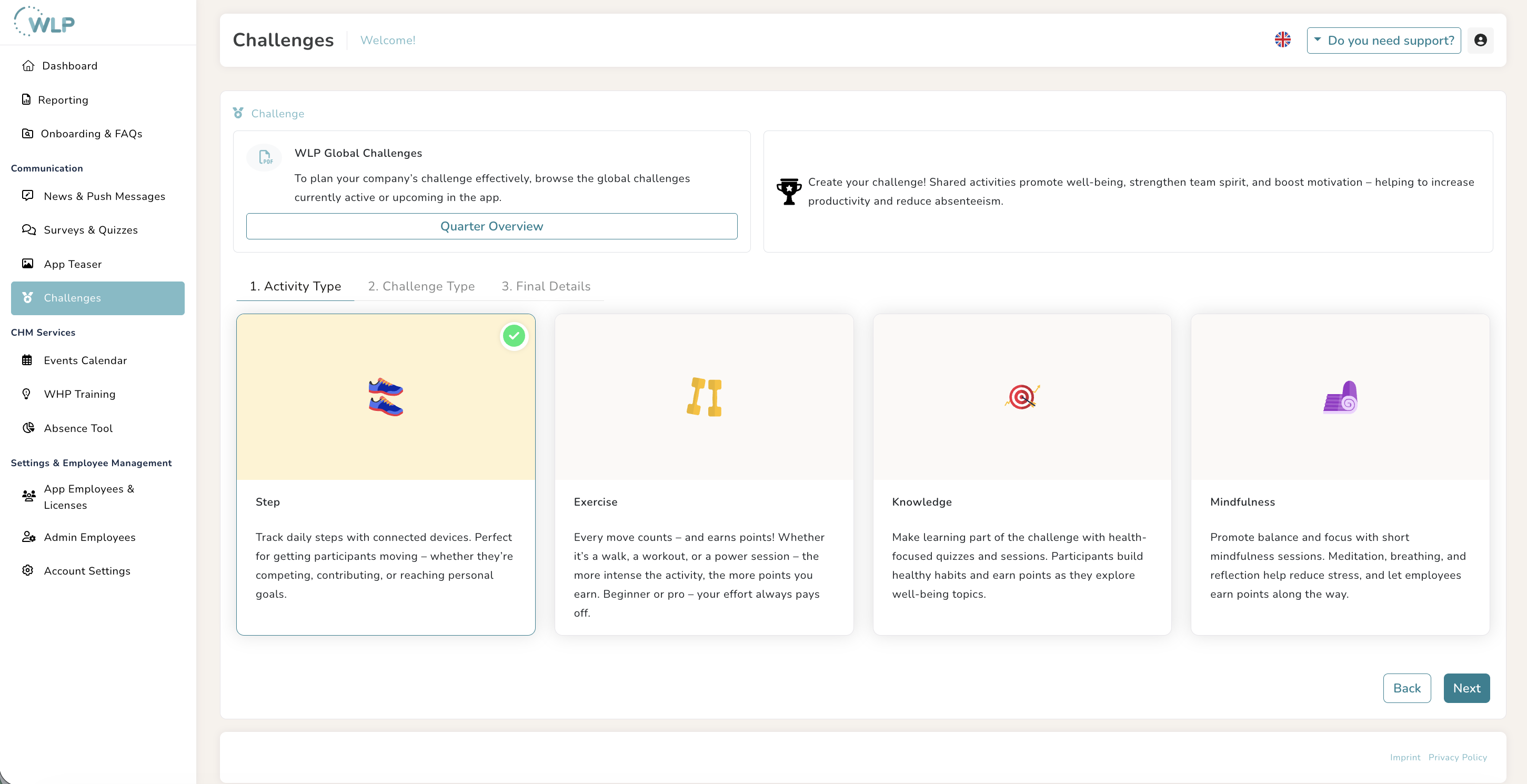
First, choose the area in which you want to start a challenge:
Steps
- You can easily collect steps with your smartphone, but please note the limit of 40,000 steps (approx. 25 km) per day.
Workouts
- You choose your own workouts from the app; you receive points for each completed session.
Knowledge
- You can freely choose which knowledge modules you want to complete in the WLP app—you receive points for each completed module.
Mindfulness
- You can freely choose which mindfulness modules you want to complete in the WLP app—you receive points for each completed module.
Combining different challenge modes is not possible.
2. Type of Challenge
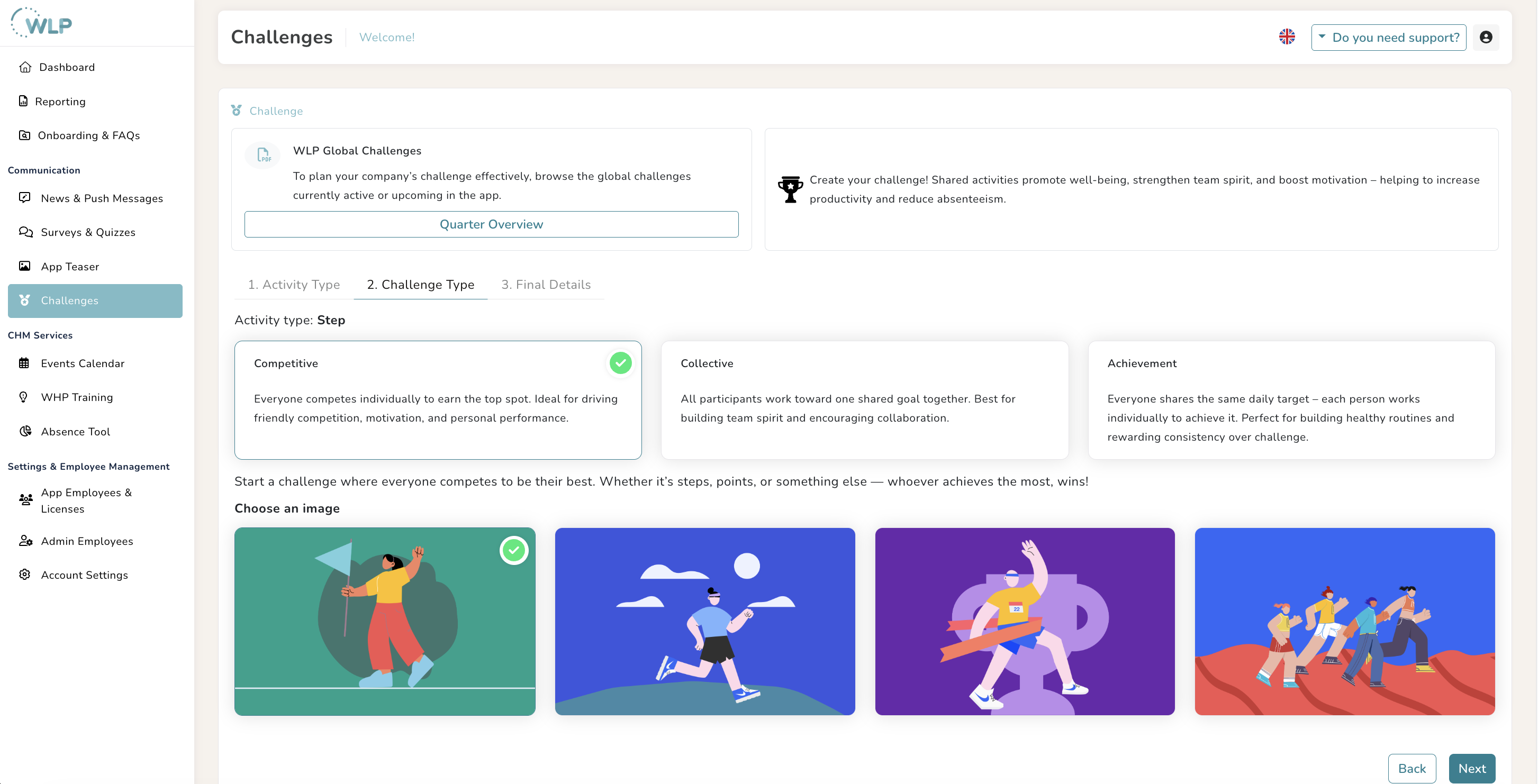
Determine which mode your challenge should take place in:
Competition:
- Everyone competes against each other, and a winner is chosen from all participants. The top-ranked participants will appear in the app within 24 hours after the challenge ends – please note: you must have participated in a challenge yourself to view its results!
Collective Goal:
- As a team, you attempt to achieve a shared goal that you define in advance. As a calculation basis for setting a realistic goal in step challenges, we suggest the following: 7,500 steps per employee daily, assuming an average participation rate of 40% in the challenge.
Daily Goals:
- Everyone individually pursues a defined daily goal. Then, select a suitable image for the respective challenge.
3. Challenge Details
Enrich your challenge with custom content:
Challenge Title: To help your employees immediately identify the company challenge, place your company name at the beginning, e.g., [Company Name] Step Challenge.
Challenge Description: In the best case, your challenge description includes the following components: the goal, prizes or other incentives, expectations, and requirements. Also, remember to formulate your description in an activating and motivating way to increase participation.
Define the Timeframe: Select a quarter and then set your start and end dates (recommendation: 2 weeks).
Example of a Challenge Description:
“The countdown is on – the [Company Name] Step Challenge is approaching!
The time has come: Our exciting step challenge begins!
We challenge each other to collect as many steps as possible – whoever gets the most steps takes the win! Let's rock this challenge!”
Communication takes place automatically (News & Push) prior to the start, as well as on the start and end dates.
4. Managing the Challenge
After setup, you will find your challenge in an overview list:
Ongoing Challenges
Date
Status (Published / Upcoming)
Participants (displayed as soon as 5 people actively participate)
Option to edit or delete
Completed Challenges
For a clear overview, you can see your challenge history here and estimate when you can plan your next company challenge.
Tips for a Successful Challenge
Set clear and realistic goals
Additionally communicate the challenge within your company in good time (e.g., via a newsletter, email, or on the intranet)
Add small rewards or incentives to motivate your employees to participate
The following questions can help you when drafting the description:
What is the timeframe of the challenge?
What is the challenge goal and how can participants achieve it?
Is there a prize for winning the challenge? (If yes, the challenge winners would need to identify themselves to you at the end so you know who is behind the nickname.)
Double check: Is the text easy to understand so that even new app users immediately know what it's all about?
Challenge evaluation – what data you can view:
To be able to evaluate the challenge at the end, it is important that you also click "Participate" at the beginning of a challenge. This gives you full visibility into the leaderboard at any time, where you can see the nicknames and their associated challenge results (e.g., the number of steps or points). Once the challenge is finished, you will see the winners at the top of the leaderboard.
Example screenshot of a completed workout challenge:
Need Support?
If you need help with setup, please attend our webinar dates or contact us using the "Do you need Support?"-button - Click the button to contact our customer service and book an appointment with us.
–––––––––––––––––––––––––––––––––––––––––––––––––––––––––––––––––––––––––––––––
Also read our articles about team- and cycling-challenges.
Was this article helpful?
That’s Great!
Thank you for your feedback
Sorry! We couldn't be helpful
Thank you for your feedback
Feedback sent
We appreciate your effort and will try to fix the article